Can You Download Whop Videos on iPhone or Mobile? The Honest Answer
Whop Downloader doesn't work on iPhone or Android — here's the real technical reason why, and what to actually do if you want your downloaded course videos on your phone.
Can you download Whop videos on iPhone or Android? Short answer: no, not directly. Whop Downloader — and every other browser-extension-based Whop downloader — only works on desktop Chrome, Edge, Brave, or Opera. There's no iPhone or Android version, and there isn't going to be one that works the same way, for reasons that are worth actually understanding rather than just accepting as a limitation.
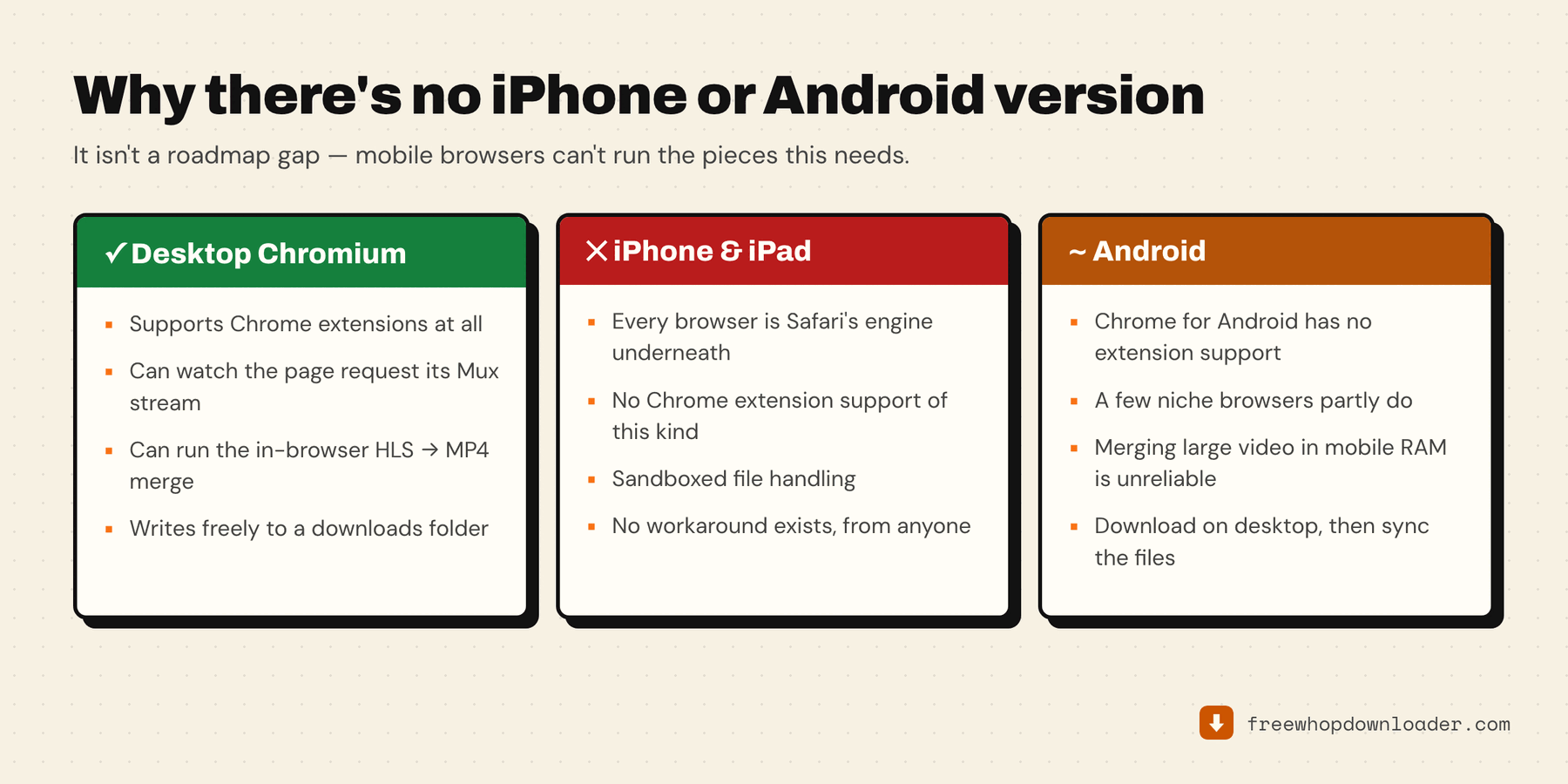
Why this isn't a "we haven't built it yet" problem
This comes down to a restriction Apple enforces at the operating system level, not a gap in development priorities.
On iOS, Safari is the only browser engine allowed. Every browser on the App Store — Chrome, Firefox, Edge, whatever you download — is required to run on Apple's WebKit engine under the hood, not its own. "Chrome for iOS" is a WebKit browser wearing Chrome's interface, not the same Chrome that runs the extension you'd install on a Mac or PC.
Safari's extension model isn't the same as desktop Chrome's. Desktop Chrome extensions (including Whop Downloader) use Chrome's Manifest V3 platform — APIs for intercepting network requests, managing downloads, running background scripts, and more. Safari on iOS supports a much narrower category called Safari Web Extensions, mostly built for content blocking and simple page modifications. There's no equivalent to the download-management and network-interception APIs the extension actually depends on.
This applies to every Chromium-based browser on iPhone, not just Safari. Because Apple mandates WebKit for all iOS browsers, installing Chrome, Brave, or Edge from the iOS App Store doesn't get you real Chrome extension support either — they're all constrained the same way Safari is.
Android is a different story technically (Chrome for Android does exist as real Chrome), but mobile Chrome on Android still doesn't support installing desktop-style extensions at all — that's an Android-Chrome product decision, not an Apple-specific one, and it's been true for years across the whole mobile extension landscape.
What actually works right now
Download on desktop, then transfer to your phone. This is the realistic path, and it's less friction than it sounds:
- Mac → iPhone: AirDrop the downloaded MP4 directly (the Mac guide covers getting it there in the first place), or use the Photos app's iCloud sync if you save it into your Photos library.
- Any desktop → any phone: Upload to a cloud drive you already use (Google Drive, Dropbox, iCloud Drive) and download it in the mobile app. For a single lesson video this takes under a minute.
- Any desktop → any phone, no internet needed later: Plug your phone into your computer via USB and drag the file over directly (Android) or use Finder/iTunes file sharing (iPhone, for apps that support it).
Once the file is on your phone, any video player app handles offline playback fine — the extension's job ends at "get you the file," not at "manage your phone's media library."
Watch the lesson directly on your phone instead, if downloading isn't the actual goal. If what you're really after is offline access rather than a permanent local copy, some video player apps and cloud-storage apps support offline caching of files you've synced — check whichever cloud service you're already transferring to.
If you're downloading a whole course to watch later on your phone, the efficient pattern is: download everything on your desktop first, then batch-transfer the finished files in one pass via cloud sync — rather than solving the mobile problem lesson by lesson. Downloading an entire Whop course offline covers the desktop half of that, including storage planning.
One thing that makes this a lot less painful than it sounds: audio-only downloads are unlimited and free, and audio is what most people actually want on a phone anyway. A lecture-style course as a folder of audio files is a fraction of the size to sync, and costs you nothing — see audio-only and video-only downloads.
Why we're not going to claim otherwise
Some tools market themselves as working "on any device" in a way that's technically true only because they route your video through their own server and hand you back a link — meaning your course content passes through infrastructure you don't control, which runs counter to the entire point of processing everything locally. Whop Downloader's local-only architecture is also exactly why it can't currently exist as a genuine mobile app the same way it works on desktop: there's no equivalent to a desktop browser's extension platform on iOS to build that architecture on top of.
If you're on a desktop already and just landed here by mistake, the step-by-step download guide is the page you want.