Every Free Whop Downloader Compared (2026): Which One Actually Works?
Tested every free Whop downloader available in 2026 — browser extensions, command-line tools, screen recorders. Here's what each one does, what it costs, and which is worth your time.
Search for a free Whop download tool and you'll find several options promising to do the same thing. They don't — the pricing models, browser support, privacy trade-offs, and ease of use are all different, and the "free" label covers everything from genuinely free to "free for three videos then you're done." This article breaks down every real option available in 2026 so you can pick one and get on with it.
Why you need a dedicated tool in the first place
Whop streams its videos through Mux, a professional video infrastructure platform. Mux serves content as HLS streams — playlists of small encrypted chunks with short-lived tokens — rather than a single downloadable file. That's why right-clicking the player gets you nothing, and why a browser extension or command-line tool is the only way to pull a clean file.
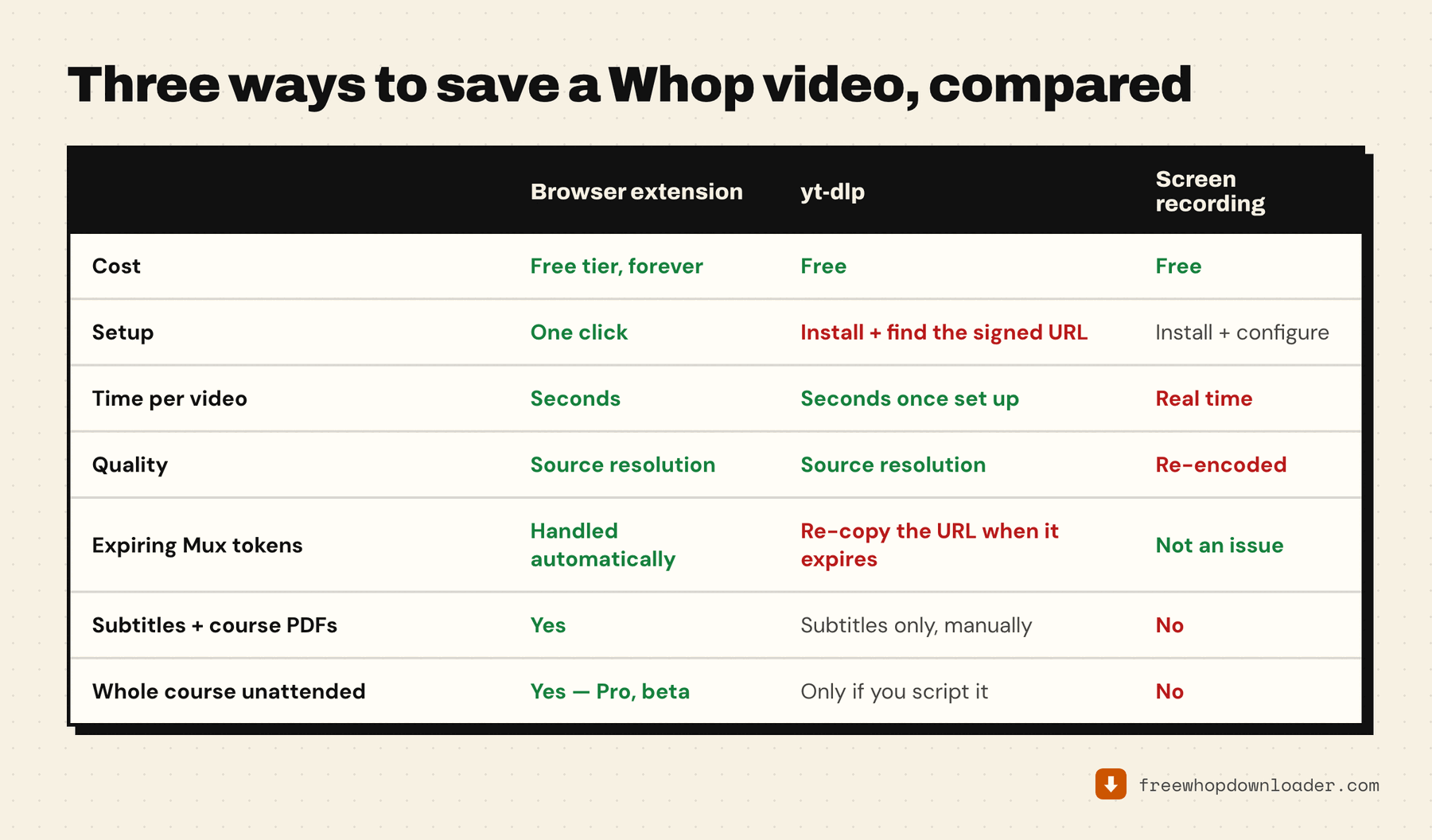
The options
1. Whop Downloader (this site)
Free tier: 3 full video+audio MP4 downloads per week, forever. Audio-only and video-only: completely unlimited, always free.
How it works: Browser extension for Chrome, Edge, Brave, and Opera. Finds the lesson's Mux stream, fetches the separate video and audio tracks at the best rendition available, and merges them into an MP4 inside the browser. It also saves subtitles automatically and can pull attached course PDFs. Nothing leaves your machine.
Setup: Install from the Chrome Web Store and pin it. That's the whole setup — there's an optional local helper app, but only for hour-plus lessons and the Pro whole-course download.
Paid option: Pro from $9.99/month (annual and one-time lifetime options too) removes the weekly limit and unlocks the whole-course download. Full walkthrough: how to download Whop course videos.
Best for: Anyone who wants a clean, private, no-signup download experience. And the "3 per week" ceiling is softer than it sounds — video-only and audio-only downloads are unmetered, so downloading both and merging locally gets you every lesson for free.
2. SERP Whop Video Downloader
Free tier: 3 downloads total as a trial, then you're done unless you buy a license.
How it works: Also a browser extension, available on more browsers including Firefox. Detects Whop-hosted video players and saves them as MP4s. SERP markets this as part of their broader downloader suite and offers a web tool companion at whopvideodownloader.com.
Privacy: Their documentation says processing happens locally via yt-dlp, though the account-creation requirement means they have your email.
Paid option: License model, prices vary.
Best for: Firefox users, since this extension doesn't support Firefox yet. The full feature-by-feature comparison is in Whop Downloader vs. Downloader for Whop.
3. yt-dlp (manual, command line)
Free tier: Completely free, unlimited, no account needed.
How it works: yt-dlp is the open-source command-line tool most of these extensions use under the hood. You run it yourself: pull the token-signed .m3u8 URL out of DevTools while the lesson plays, hand it to yt-dlp, and it fetches and merges the streams. No caps, no weekly limits. Step by step: downloading Whop videos manually with yt-dlp.
The catch: the DevTools step, every single time, plus the token expiring mid-job if you dawdle. If that sounds fine, yt-dlp is the most powerful option here. If not, stick to the extensions.
Best for: Developers, power users, and people downloading large course libraries where the weekly caps of any extension become a bottleneck.
4. Screen recording (OBS, QuickTime, Bandicam, etc.)
Free tier: Most screen recorders are free or have generous free tiers.
The problem: Screen recording is not a download — it's a capture. You sit through the video in real time while your screen recorder transcodes what it sees into a new video file. The quality degrades through that re-encode (you're capturing pixels, not the original stream), you capture at 1x playback speed so a two-hour module takes two hours to "save," and any cursor movement, notification, or stuttering stream shows up in your recording.
A four-hour course captured this way takes four hours, produces a file that's larger than the original, and looks worse. It's also easy to accidentally capture system sounds, browser alerts, and whatever's on screen when a notification pops.
Best for: Capturing live events or streams where no download option exists. For pre-recorded course videos it's the worst method here — the full side-by-side is in screen recording vs downloading.
Side-by-side comparison
| Whop Downloader | SERP | yt-dlp | Screen recording | |
|---|---|---|---|---|
| Actually free | Yes — 3 MP4/week forever | Trial only (3 total) | Yes, unlimited | Yes |
| Source quality | Original stream | Original stream | Original stream | Re-encoded |
| Speed | Fast (async fetch) | Fast | Fast | Real-time |
| Privacy | Local, no account | Account required | Local, no account | Local |
| Setup difficulty | Low | Low | High | Low |
| Chrome/Edge/Brave/Opera | Yes | Yes | N/A | Yes |
| Firefox | No (planned) | Yes | N/A | Yes |
| Audio-only | Unlimited free | Not listed | Yes | Manual |
| Subtitles | Automatic | Not listed | Manual | No |
| Whole course unattended | Pro (beta) | Per page | Only if scripted | No |
Which one should you use?
If you want zero setup and a real free tier: Whop Downloader. Three full MP4s per week covers most people for casual study, and audio-only downloads are completely free so you can pull lecture audio without touching your weekly cap.
If you need Firefox: SERP for now, or Whop Downloader once the Firefox build ships.
If you're archiving a whole course: read downloading an entire Whop course offline before picking — the right answer changes a lot depending on whether you're doing 5 lessons or 50.
If you're archiving a large library and don't mind a terminal: yt-dlp gives you the most power for zero ongoing cost.
If you're considering screen recording: Don't. It's slower, lower quality, and produces bigger files than just downloading the original stream.